Últimos Addons
O nó de Classificação de Álbuns adiciona um subnó "Classificação de Álbuns" às suas coleções. Ele agrupa os álbuns de uma coleção por sua classificação (de 5 estrelas a 0,5 estrelas, péssimo e desconhecido), para que você possa navegar rapidamente pelos seus álbuns com melhor e pior classificação, de forma semelhante ao nó de Classificação existente para faixas, mas baseado em álbuns.
IMPORTANTE: Habilitar o nó requer uma licença MediaMonkey Gold. O subnó é ativado nas configurações da coleção, e a edição ou criação de coleções é um recurso exclusivo da versão Gold (a versão gratuita exibe a caixa de diálogo de registro da versão Gold).
Translated automatically (see original)Album Rating Node adds an "Album Rating" sub-node to your collections. It groups the albums of a collection by their album rating (5 stars down to 0.5 stars, bomb and Unknown), so you can browse your best and worst rated albums at a glance, similar to the existing Rating node for tracks, but based on albums.
IMPORTANT: Enabling the node requires a MediaMonkey Gold license. The sub-node is switched on in the collection settings, and editing or creating collections is a Gold feature (the free version shows the Gold registration dialog instead).
Hide original
By
AI (inspired by Fetzenschaedl)
Enviado por fetzenschaedl
Atualizado 11/10/2026
Histórico de versões / Detalhes
- Versão:
- 0.1
- Atualizado:
- 11/10/2026
- Size:
- 19.83 KB
- Funciona com:
- Media Monkey 2024 - 2027
O Cover Browser substitui a pré-visualização padrão de capa única do MediaMonkey por um visualizador expandido que permite aos usuários percorrer e inspecionar todas as capas incorporadas (frente, verso, páginas do livreto, discos, etc.) de uma faixa ou álbum.
Principais características
Navegação entre várias capas: Navegue por todas as capas usando as teclas de seta, os botões na tela ou a roda do mouse (com opção de rolagem contínua).
Barra de informações detalhadas: Exibe a posição do contador de capas, o tipo de capa, o tamanho em pixels/arquivo e o local de armazenamento.
Controles de imagem:
Rotação: Rotação de 90° (ideal para páginas digitalizadas de folhetos).
Zoom e panorâmica: zoom de 25% a 400% com panorâmica por meio de clique e arrastar.
Ajustar janela à imagem: Redimensiona e reposiciona a janela para corresponder à proporção da capa sem ultrapassar os limites da barra de tarefas.
Suporte para livretos em PDF: Exibe livretos em PDF incorporados diretamente no visualizador.
Interface de usuário com ocultação automática: a barra de ferramentas desaparece automaticamente quando o cursor do mouse não está em uso.
Modo de segurança alternativo: Funciona como a visualização padrão caso haja apenas uma capa ou se o carregamento falhar.
Limitações conhecidas
Âmbito de visualização do álbum: Para álbuns, apenas as capas pertencentes à primeira faixa são exibidas.
Restrições de PDF: folhetos em PDF não podem usar as ferramentas personalizadas de rotação, zoom ou ajuste à janela do complemento (em vez disso, usam as ferramentas integradas do visualizador de PDF). O suporte para ilustrações em PDF também depende da versão do MediaMonkey.
Alinhamento da rotação do zoom: a rotação de 90°/270° com o zoom aplicado pode parecer ligeiramente descentralizada.
Cover Browser replaces MediaMonkey default single-cover preview with an extended viewer that allows users to cycle through and inspect all embedded covers (front, back, booklet pages, discs, etc.) for a track or album.
Key Features
Multi-Cover Navigation: Flip through all covers using arrow keys, on-screen buttons, or the mouse wheel (with optional wrap-around).
Detailed Info Bar: Displays cover counter position, cover type, pixel/file size, and storage location.
Image Controls:
Rotate: 90° rotation (ideal for scanned booklet pages).
Zoom & Pan: 25% to 400% zoom with click-and-drag panning.
Fit Window to Image: Resizes and repositions the window to match the cover's aspect ratio without crossing taskbar boundaries.
PDF Booklet Support: Displays embedded PDF booklets directly within the viewer.
Auto-Hiding UI: Toolbar automatically fades out during mouse inactivity.
Safe Fallback: Operates like the default view if only one cover is present or if loading fails.
Known Limitations
Hide original
Album View Scope: For albums, only covers belonging to the first track are displayed.
PDF Restrictions: PDF booklets cannot use the add-on's custom rotate, zoom, or window-fitting tools (uses built-in PDF viewer tools instead). Support for PDF artwork also depends on the MediaMonkey version.
Zoom Rotation Alignment: 90°/270° rotation while zoomed in may appear slightly off-center.
By
AI (Inspired by Fetznschaedl)
Enviado por fetzenschaedl
Atualizado 06/10/2026
Histórico de versões / Detalhes
- Versão:
- 0.5.1
- Atualizado:
- 06/10/2026
- Size:
- 59.81 KB
- Funciona com:
- Media Monkey 2024 - 2027
- Mudanças:
What's New in 0.5.1
-
Automatic Window Fitting & Centering: Dynamically resizes the window to match cover dimensions while browsing, with flexible options to center the window relative to your monitor or keep its previous position, optimized for multi-monitor setups with seamless, flicker-free image loading.
-
Background Duplicate Detection: Automatically filters out duplicate covers (e.g., matching embedded tag images and folder files) in the background without freezing the UI or delaying image displays.
-
Enhanced Folder Scanning & UI Feedback: Better handling of large image folders with configurable display limits, validated settings, and clear status indicators (such as ... and +) to show when background scanning is underway.
-
- Versão:
- 0.2
- Atualizado:
- 29/09/2026
- Size:
- 36.64 KB
- Funciona com:
- Media Monkey 2024 - 2027
- Mudanças:
Version 0.2.0
-
Folder Files Integration: Automatically appends images and optionally PDFs from the track's folder, subfolders, and parent folder to the cover list for browsing (requires MediaMonkey 5.0.4+). Adds configurable options for inclusion and depth/file limits.
-
Duplicate Prevention: Skips folder files that duplicate existing tag covers based on file path and storage details.
-
UI & Display Enhancements: The info bar now displays Folder, pixel dimensions, file size, and relative path. Works fully even when showing a folder file without tagged covers.
Version 0.1.3
-
Reworked Zoom System: Changed zoom percentages to reflect original pixel dimensions (100% = actual size) using fixed levels (10% to 800%). Smooth transitions from "Fit" mode without sudden jumps.
-
Center Anchor & Quality: Zooming now retains the current view's center point, and maximum source resolution was increased to 5000 px for crisp viewing of high-res covers.
-
New Shortcut: Added shortcut key 1 to jump directly to actual size (100%).
-
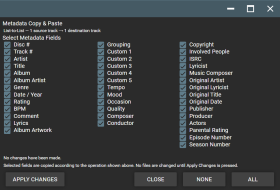
O recurso Copiar e Colar Metadados traz a funcionalidade de copiar e colar metadados de forma flexível para o MediaMonkey 5 Mobile.
Copie os metadados selecionados de uma ou mais faixas de origem e cole-os em uma ou mais faixas de destino usando quatro modos de transferência:
• Individual
• Lista para lista
• De um para muitos
• Muitos para um
A tela detalhada de seleção de campos permite que você escolha exatamente quais campos de metadados transferir, incluindo Artista, Título, Álbum, Artista do Álbum, Gênero, Data/Ano, Classificação, BPM, Comentário, Letra, Compositor, Maestro, Editora, Produtor, campos personalizados e outros metadados de faixa compatíveis.
A arte da capa do álbum também pode ser selecionada para transferência, seja juntamente com os metadados ou separadamente.
O complemento foi projetado para fornecer funcionalidades semelhantes aos recursos Copiar Metadados / Colar Metadados encontrados na função Encontrar e Corrigir Duplicados Avançados do MediaMonkey 4, adaptados para o MediaMonkey 5 Mobile.
Translated automatically (see original)Metadata Copy & Paste brings flexible metadata copying and pasting to MediaMonkey 5 Mobile.
Copy selected metadata from one or more source tracks and paste it to one or more destination tracks using four transfer modes:
• One-to-One
• List-to-List
• One-to-Many
• Many-to-OneThe detailed field-selection screen lets you choose exactly which metadata fields to transfer, including Artist, Title, Album, Album Artist, Genre, Date/Year, Rating, BPM, Comment, Lyrics, Composer, Conductor, Publisher, Producer, custom fields, and other supported track metadata.
Album Artwork can also be selected for transfer, either together with metadata or independently.
The addon is designed to provide functionality similar to the Copy Metadata / Paste Metadata features found in MediaMonkey 4's Advanced Duplicate Find & Fix, adapted for MediaMonkey 5 Mobile.
Hide original
By
Project 37
Enviado por Project37
Atualizado 21/09/2026
Histórico de versões / Detalhes
- Versão:
- 3.3.3
- Atualizado:
- 21/09/2026
- Size:
- 4.68 KB
- Licença:
- None
- Funciona com:
- Media Monkey V2024.2.2 - V2024.2.2.3222
- Mudanças:
Version 3.3.3
Right click on a file and scroll down to "Edit tags" and then the popup screen will list "Copy Metadata" & "Paste Metadata" options.
• Added Album Artwork as a selectable transfer option.
• Album Artwork can be copied together with selected metadata or transferred independently.
• Album Artwork works with One-to-One, List-to-List, One-to-Many, and Many-to-One operations.
• Added support for transferring artwork across multiple source and destination tracks.
• Preserved the detailed metadata field-selection interface and existing transfer functionality.
• Tested on MediaMonkey 5 Mobile.

Anuncia o título e o artista da faixa em reprodução por meio de texto para fala e sobreposição de texto grande. Este projeto pessoal foi criado como uma forma de aprender os nomes das minhas faixas de DJ enquanto as ouço, para que eu possa consultá-las mais facilmente quando estiver criando um set.
Translated automatically (see original)Announces the playing track title and artist via text-to-speech and large text overlay. This pet project was created as a means of learning the names of my DJ tracks as I listen to them so I can go back to them more readily when I am making a DJ set.
Hide original
By
MicroRaveNZ
Enviado por MicroRaveNZ
Atualizado 21/09/2026
Histórico de versões / Detalhes
- Versão:
- 1.0.8
- Atualizado:
- 21/09/2026
- Size:
- 6.75 KB
- Funciona com:
- Media Monkey 5.0
- Mudanças:
Announces the playing track title and artist via text-to-speech and large text overlay. This pet project was created as a means of learning the names of my DJ tracks as I listen to them so I can go back to them more readily when I am making a DJ set.
Adicionar álbum à fila após o álbum atual
Visão geral
Este complemento aprimora o MediaMonkey 5 adicionando uma opção ao menu de contexto para enfileirar álbuns inteiros diretamente após o álbum que está sendo reproduzido na sua lista "Reproduzindo Agora" — em vez de adicioná-los ao final da fila.
Principais características e como funciona
Ponto de Inserção Inteligente:
Os álbuns selecionados são inseridos imediatamente após a última faixa do álbum que está sendo reproduzido, mantendo intacta a sua ordem de reprodução atual, sem empurrar as novas adições para o final de uma longa fila.
Adicionar o álbum completo à fila:
Basta selecionar uma única faixa (ou várias faixas de álbuns diferentes), clicar com o botão direito do mouse e selecionar "Adicionar álbum(ns) à fila após o álbum atual" . A extensão busca e insere automaticamente todas as faixas de cada álbum selecionado na ordem correta de faixas e discos.
Proteção contra duplicados:
Os álbuns que já estão presentes na sua lista "Reproduzindo agora" são automaticamente ignorados para evitar reprodução duplicada.
Aviso de fila grande:
Para evitar adições acidentais, uma mensagem de confirmação será exibida se a sua seleção exceder 200 faixas.
Notificações de feedback:
Uma breve notificação pop-up (toast) confirma quantos álbuns foram adicionados e lista quaisquer duplicados ignorados.
Queue Album(s) after Current Album
Overview
This add-on enhances MediaMonkey 5 by adding a context menu option to queue entire albums directly after the currently playing album in your "Now Playing" list—rather than appending them at the very end of your queue.
Key Features & How It Works
Hide original
Smart Insertion Point:
Selected albums are inserted immediately after the final track of the currently playing album, keeping your immediate listening order intact without pushing new additions to the bottom of a long queue.
Full Album Queuing:
Simply select a single track (or multiple tracks from different albums), right-click, and select "Queue Album(s) after Current Album". The extension automatically fetches and inserts all tracks for each selected album in proper track and disc order.
Duplicate Protection:
Albums that are already present in your current "Now Playing" list are automatically skipped to prevent duplicate playback.
Large Queue Warning:
To prevent accidental additions, a confirmation prompt appears if your selection exceeds 200 tracks.
Feedback Notifications:
A brief pop-up notification (toast) confirms how many albums were added and lists any skipped duplicates.
By
AI (Inspired by Fetznschaedl)
Enviado por fetzenschaedl
Atualizado 18/08/2026
Histórico de versões / Detalhes
- Versão:
- 1.0
- Atualizado:
- 18/08/2026
- Size:
- 5.27 KB
- Funciona com:
- Media Monkey 2024 - 2024